An SRA-regulated firm site that answers "where do I start?" before it asks for anything.
What a great accounting website needs in 2026
The short answer
A great accounting website makes an intimidating service concrete. Clients want to know what the firm does and what it is worth, so the site pairs plain-spoken service tiers with a working savings calculator — real current-year tax math, not marketing numbers — and a low-pressure consultation path.
By Nikolai Bhend · Updated September 2, 2026 · Audited to WCAG 2.2 AA
What the best accounting websites do in 2026 — the practices this template is built to prove.
The demo is the evidence
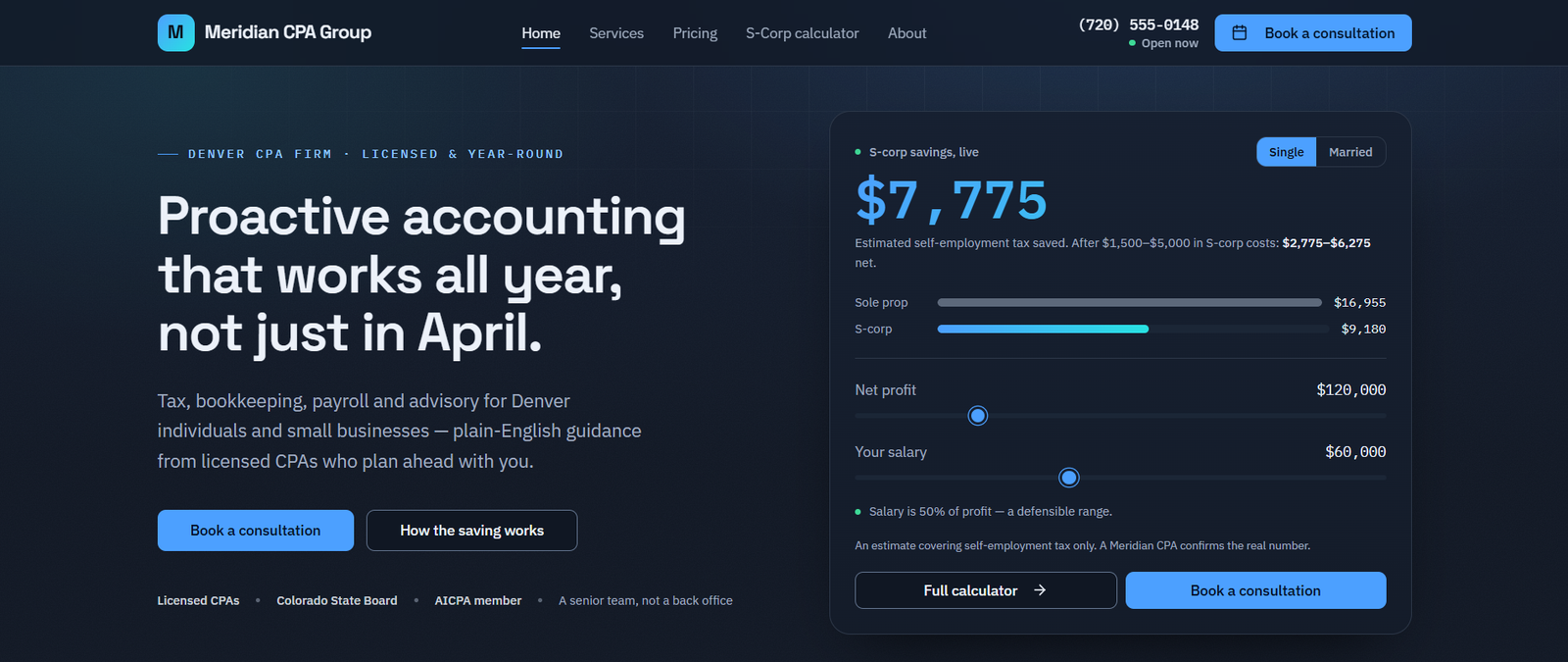
Meridian CPA Group — a fictional accounting in Denver, CO — is this template running live at accounting.horizonstemplates.com. Primary action: “Book a consultation”. Load it right here, flip it to mobile, or open it full-size.
Free to make yours: on the demo, choose Use template in the Hostinger bar at the bottom of the page — it starts you from this exact build in Hostinger Horizons. Publishing the finished site needs a Horizons plan; this directory charges nothing.
What does a great accounting website need in 2026?
It has to make an intimidating, high-trust service concrete and prove competence in seconds. Prospects comparing accountants keep multiple tabs open and scan for specific trust signals — the firm's state-board license number, an AICPA badge, the partner's IRS PTIN — treating them as pass/fail; making those implicit is the same as not having them.
The template puts those CPA-specific signals up front, lays out services plainly, and turns an abstract value proposition into something a visitor can see for themselves.
Why an interactive calculator instead of marketing claims?
Because a working tool proves value in a way copy cannot, and it does it honestly. The S-corp savings calculator runs real 2026 figures — the Social Security wage base, self-employment rates, additional-Medicare thresholds — and flags when an assumed salary looks indefensible, producing a downloadable branded estimate.
It is an estimate tool with transparent assumptions, not a sales gimmick — the kind of functional, time-saving asset that pre-qualifies a lead instead of dropping an unvetted inquiry onto a busy calendar.
Should an accounting firm publish pricing?
Where it can, yes. Nearly every high-performing CPA site publishes pricing or tiers, because prospects with several tabs open will skip a firm that makes them schedule a call just to learn what it costs.
The template lays out all six services — tax preparation, tax planning, bookkeeping, payroll, small-business advisory and IRS notice resolution — with transparent from-prices, so individuals and businesses can self-select the right engagement rather than being funneled through one generic contact form.
How do credentials build trust and E-E-A-T?
Through named specificity. Five named professionals appear with their credentials in visible bios and matching Person schema, so the same names and qualifications an prospect reads are the ones a search engine parses.
That is paired with an institutional trust stack — IRS, state board and AICPA — and, critically, no fabricated reviews: on a financial-services site, invented numbers are both a credibility risk and a regulatory one.
Why the credible-fintech look instead of traditional beige?
Because design signals competence in a category where trust is everything. A slick, dark, numbers-forward system reads as precise and modern — deliberately unlike the dated, spreadsheet-era sites it competes with, which quietly cost firms credibility.
The aesthetic is not decoration: it reinforces the operational integrity that corporate clients and CFOs look for before they hand over sensitive financial data.
Is it accessible, fast, and simple for a firm to maintain?
Yes. It is verified against WCAG 2.2 AA, kept deliberately lightweight, and driven entirely from structured content: team bios, credentials, service tiers and the calculator's assumptions all live in one place. Rebranding is data entry, and the consultation path points at whatever scheduler your firm already runs.
What we shipped and measured
First-party specifics from this build and its four audits — not marketing claims. Every item is visible in the live demo.
- S-corp savings calculator on real 2026 figures, with a salary-defensibility flag
- Downloadable branded estimate generated from the calculator
- CPA trust stack: state license, AICPA, IRS PTIN, state-board — no fabricated reviews
- Six services with transparent from-prices: tax prep, planning, bookkeeping, payroll, advisory, IRS resolution
- Five named professionals with credentials in visible bios and Person schema
- 4 sequential audits · WCAG 2.2 AA verified
Questions
Yes. It uses genuine 2026 figures — the Social Security wage base, self-employment rates and additional-Medicare thresholds — and flags when an assumed salary looks indefensible rather than quietly inflating the savings. It is an estimate tool with transparent assumptions, not a lead-generation gimmick dressed up as arithmetic.
Yes. The services architecture separates individual and business engagements cleanly, so a freelancer and a twenty-person company each find the right tier without a discovery call. The consultation path serves both, and the calculator is aimed at the owner-operators most likely to be leaving money on the table.
The template assumes you will publish tiers rather than exact fees, because prospects comparing firms with several tabs open tend to skip anyone who makes them book a call just to learn what something costs. Ranges give enough for self-selection while leaving room for scoping.
Your firm name, state-board licence number, AICPA membership, the partner's IRS PTIN, and the named professionals with their real credentials. Contact details ship as obvious placeholders, and the calculator's tax constants are in one place so they are simple to update each filing year.
Related templates
Ready to build your accounting site?
Open the live demo, walk through it like a customer, then make it yours.