A neighborhood café and roastery site that sells the ritual first — and always knows whether it is open.
What a great restaurant website needs in 2026
The short answer
A great restaurant website answers three questions fast: what do you serve, is it good, and how do I book. The menu is the most-visited page on any restaurant site, so it deserves real engineering — readable, filterable by diet, and identical everywhere it appears.
By Nikolai Bhend · Updated September 2, 2026 · Audited to WCAG 2.2 AA
What the best restaurant websites do in 2026 — the practices this template is built to prove.
The demo is the evidence
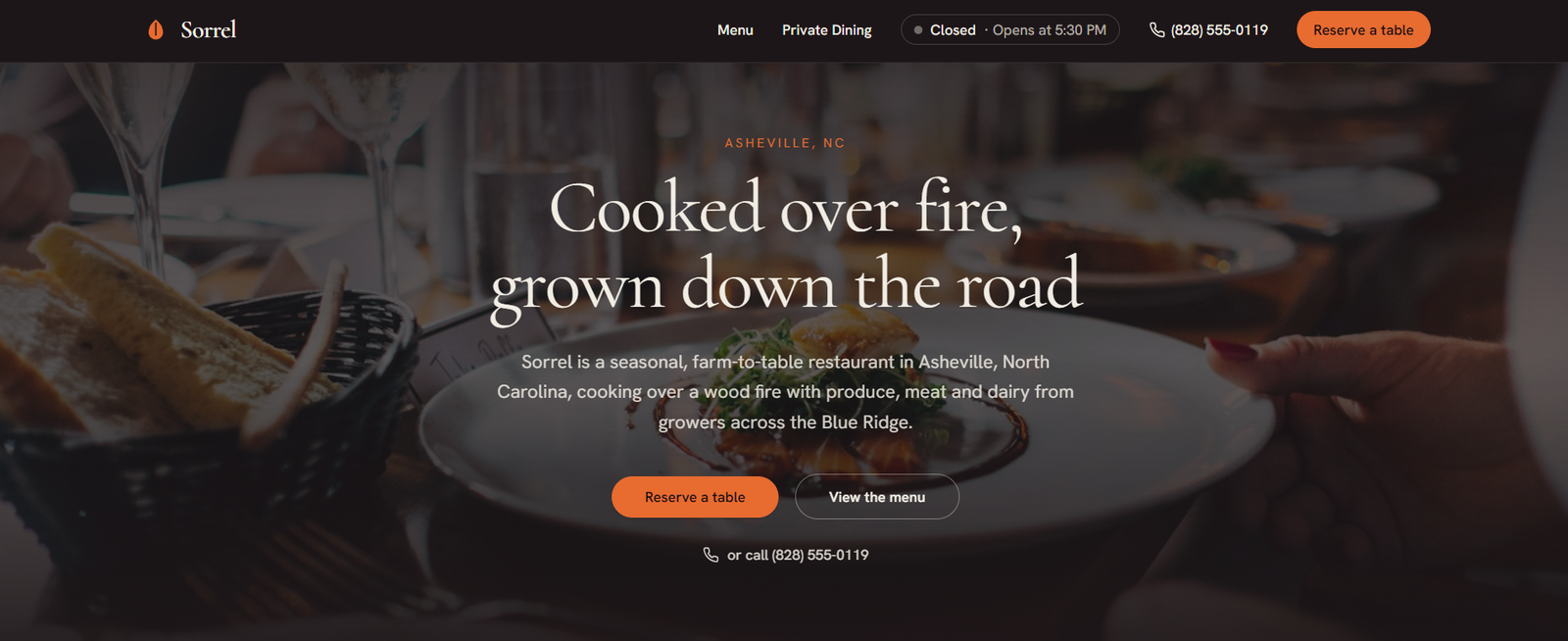
Sorrel — a fictional restaurant in Asheville, NC — is this template running live at restaurant.horizonstemplates.com. Primary action: “Reserve a table”. Load it right here, flip it to mobile, or open it full-size.
Free to make yours: on the demo, choose Use template in the Hostinger bar at the bottom of the page — it starts you from this exact build in Hostinger Horizons. Publishing the finished site needs a Horizons plan; this directory charges nothing.
What does a great restaurant website need in 2026?
It has to answer four questions in the first mobile viewport: what is on the menu, is it any good, how do I book, and where are you. Over 70% of restaurant traffic is mobile and most diners decide after a quick glance, so the site is a 24/7 salesperson, not a brochure — and burying the menu is what loses customers, not the hero photo.
The template surfaces the menu and the reserve action immediately, keeps reservation as the single primary call from hero to footer, and is built mobile-first with large tap targets.
Should the menu be a PDF or native web pages?
Native, without exception. A PDF menu loads slowly on mobile, cannot be read or copied easily, is invisible to Google, and quietly signals "we made this once, years ago." Rebuilding the menu in real HTML is the single fastest conversion lift on most restaurant sites.
The demo renders the menu as native content with clear categories, prices and dietary tags, so it loads fast, ranks for individual dish searches, and lets a diner read it with one thumb.
How does the menu filter without breaking?
Dietary filtering is built accessibly — fully keyboard and screen-reader operable — and, critically, nothing on screen shifts, jumps or resizes as filters change. State is shown without moving the content a diner is already reading.
That zero-layout-shift discipline is what makes the filter feel solid rather than janky, and it is applied to every interactive control on the page.
Why does one menu source matter for search?
Because the visible menu and its structured data are generated from a single source, so the schema always matches the plate — byte for byte. Dietary suitability shown to a diner is the exact suitability a search engine reads.
That eliminates the drift that plagues hand-maintained schema, where the marked-up menu slowly diverges from the real one, and it means a single edit updates the page, the filters and the structured data together.
How does provenance build trust without fabrication?
With real names. A named chef byline and named growers give the seasonal story actual people, which is the expertise-and-trust signal engines reward and diners believe — and it is honest, unlike invented review counts. The template ships named provenance and leaves review display to genuine, consented sources.
Is it accessible, fast, and easy to update?
Yes — audited to WCAG 2.2 AA with reserve reachable within thumb range on every screen, deliberately lightweight, and driven from structured menu data. Reservation connects to whatever booking system your floor already runs, and changing the menu is editing one file, not redrawing a page.
What we shipped and measured
First-party specifics from this build and its four audits — not marketing claims. Every item is visible in the live demo.
- Native HTML menu from one data source — no slow, unindexable PDF
- Accessible dietary filtering — keyboard and screen-reader correct
- Byte-identical menu schema (suitableForDiet) generated from the same source
- Named-chef and named-grower provenance for real E-E-A-T
- Reserve action within thumb reach on every screen; ≥24px targets
- 4 sequential audits · WCAG 2.2 AA verified
Questions
Yes. Reservation is the single primary journey in the demo and is designed to point at whatever booking platform your floor already runs. Because it is one consistent action rather than several competing calls, connecting it updates the hero, the menu page and the footer together.
The menu is structured data, not a PDF or an image, so editing one file updates the visible menu, the dietary filters and the structured data at the same time. That is what keeps the marked-up menu from slowly drifting away from what the kitchen is actually serving.
Yes. Dietary filtering is fully keyboard and screen-reader operable, and nothing on screen shifts or jumps as filters change. The suitability a diner sees is the exact suitability search engines read, because both are generated from the same source rather than maintained separately.
It helps, but the template does not depend on it. The layout leads with the menu and the reservation action rather than a wall of imagery, and image slots are clearly marked as yours to fill — no stock photos of someone else's food pretending to be your kitchen.
Ready to build your restaurant site?
Open the live demo, walk through it like a customer, then make it yours.